INTRODUCING
Stop recommending. Start showing.
ASK LIKE A PRO - COURSE 7
Live Online · One session · 3 hours · Limited to 8 students · No Prerequisites

You did the research. Earned the insight. Delivered the recommendation.
It was misinterpreted. Deprioritized. Shelved. Anyone who has ever watched a great recommendation disappear knows this pain. This course is the fix.
What if you could show them instead?
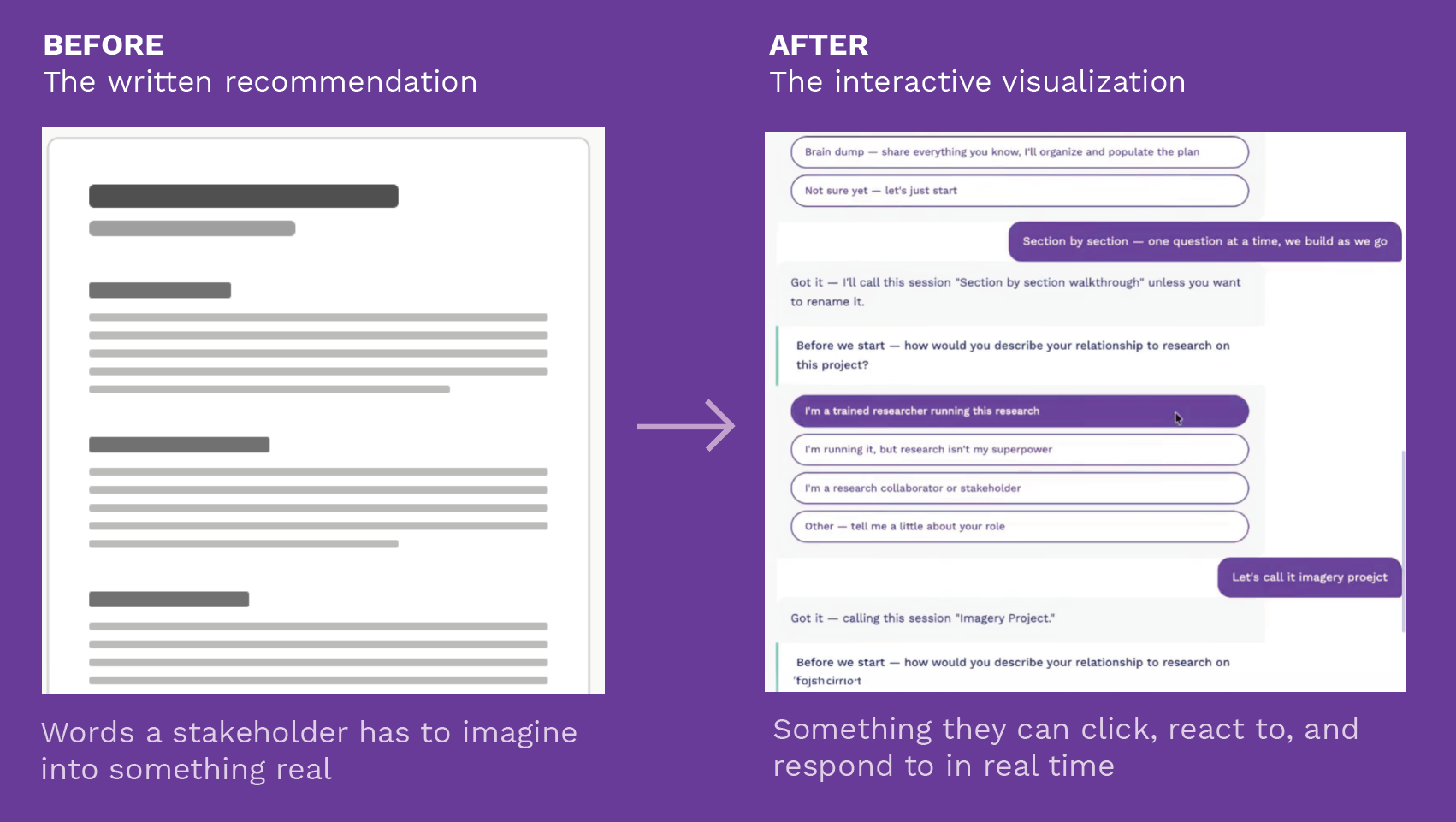
What used to be enough isn’t anymore.
Sharing literal recommendations isn't enough anymore. Making is. Showing is. Shipping is. Any researcher who wants to stay relevant in tech has to learn these skills. That's not fear-mongering. That's the reality.
Businesses don't have time for decks and reports. They need to see it, touch it, react to it. Fast, affordable, good enough — that's what teams want now. Researchers who can deliver tangible visuals are indispensable. Researchers who can't are at risk.
Researchers don't build because they want to be builders. They build to bring their insights to life. To remove the barriers between recommendation and action. To get ahead of the misinterpretation, the resourcing debates, the prioritization battles, and the handoff issues that swallow good work whole.
What Past Students Say
"But I’m not a designer.”
Neither is the point. You don't need to learn to code or design. You need to learn to turn your recommendations into a prompt to inform the design. That's an easy bridge to build.
This isn't about design talent. It's about translating your recommendations into tangible visualizations. You've watched real people interact and respond. You know what confusion looks like, what friction feels like, and how better could manifest. That's enough to work with.
We'll show you how to find the right visual references — and use them to prompt your way to something real.
This will be a safe space. Judgment-free, structured, and designed for doing. You will leave with something real. Not polished. Real. Because the real value isn't the artifact — it's what happens in the room when someone experiences it. It's the moment someone says — I get this. We need to explore this. We cannot ignore this.
-
You don't need to code.
You need to learn how to prompt for visuals — to describe what you want clearly enough for the tools to produce it. Researchers articulate what good looks like for a living. Visual prompting is just the next sentence.
-
Getting to 80% is the goal.
Not a polished product. Not a final design. The bones. Real enough to put in front of people — to answer a question, illustrate a recommendation, or test an idea. Stop when you can do that.
-
Agency from day one.
Researchers who build don't wait for someone else to act on their work. They don't wait for the prioritization meeting, the design queue, or the next sprint. They show what they mean — and the conversation starts there.
Are we building the right thing? Are we building the thing right?
Both are research questions. Both are yours to answer.
Most teams skip straight to the second question — are we building it right? They build fast, iterate fast, and hope the direction is right. It often isn't. And when it isn't — the researcher usually knew.
The problem isn't the answer. The problem is that a written recommendation isn't enough to make the answer land.
The question used to be: what can we build? We figured out pretty quickly that we can build almost anything. The question has shifted to what should we build — and how do we know we built it right? That's your territory. Always has been.
Become the catalyst. Build the prototype that makes your recommendation impossible to ignore. Reduce the risk that your best work gets shelved, misinterpreted, or quietly deprioritized before it ever reaches the people it was meant to help.
Who It’s For
Complete beginners welcome. If you've already been experimenting, this takes you further.
✔ Anyone who has ever watched a great recommendation disappear
✔ Researchers and research operations professionals
✔ Independent consultants who want to deliver more than a report
✔ Marketers and non-designers who want more agency and impact
✔ Anyone between roles who wants a portfolio piece and a new skill
What you'll walk away with
Something real enough to put in front of people — to answer a question, illustrate a recommendation, or test an idea. Constructed from one of three sample projects or a brief of your own. Not a literal description of what could exist. The visual bones of the thing itself. Ready to share, test, and hand off. Primed for iteration. Ready to add to your case studies — and potentially the foundation of a future service you offer.
The Workshop
One session · 3 hours · 8 students maximum
The Shift
Why showing beats telling every time — and why the timing has never been better. You don’t need to code or design — you need to learn to prompt for visuals. What makes a build or prototype strong: built to answer a question, illustrate a recommendation, or test an idea. Are we building the right thing? Are we building the thing right? Both are research questions. Both are yours.
Part 1
Part 2
Choose Your Project and Your Medium
Three sample projects — scoped, NDA-safe, and ready to build. Or bring your own with a one-sentence brief approved in advance. Meet the three mediums: video prototype, clickable mockup, working build. Choose your project, name what it’s designed to answer, pick your medium.
Part 3
Build (~75 minutes)
Guided build time with facilitated support. Prompt templates provided for all three mediums and all three sample projects. Michele works the room — if you’re stuck, you won’t stay stuck.
Part 4
Share and Learn
Each student shares their build or work in progress. Structured group feedback: what landed, what questions it raised, what it made people want to do next. The bridge to Iterate: what happens after Build.
Workshop Deliverable: A working build or prototype ready to put in front of real people — and ready to add to your portfolio or case studies.
Three Sample Projects or Bring your Own
No project? No problem. No NDA worries either. Each is scoped, realistic, and ready to build in 75 minutes.
You don’t know what you don’t know yet. The sample projects show you what you can’t anticipate on your own — and give you a clear starting point. If you can’t clearly explain the problem, the person it’s for, and what success looks like — you’re not ready to prompt. A tool will happily fill in the gaps with something that looks right and is completely wrong.
Project 01
Onboarding Drop-Off
for in-house researchers
Users abandoning at a specific step because the language doesn’t match how they think. Build a prototype showing the revised flow.
Project 02
Research Repository
for research ops
Insights scattered across decks, docs, and emails. Build a simple searchable repository that makes past research findable. Scope note: constrain to one core interaction.
Project 03
Expertise Showcase
for consultants & job seekers
Demonstrate your methodology to prospective clients, collaborators, or employers without giving everything away. Build a one-page interactive case study or service preview.
Bring Your Own
Working on something you can share? Submit a one-sentence brief for approval before registration is confirmed. If your project needs more than 75 minutes of build time, we'll help you scope it down or pair you with a sample project that's close to what you need.
What a strong build looks like
Five criteria. Keep them in mind before you start. If you can check all five, you’re ready to share.
✔ Clarity of intent: Someone can experience it and immediately understand what it’s showing and why it matters. No explanation required.
✔ Scoped to the point: You built only what was needed to make the idea tangible. Not everything — the one thing that removes the ambiguity.
✔ Real enough to react to: A real stakeholder would respond with more than “that’s interesting.” The real value isn’t the artifact. It’s what happens in the room when someone experiences it. It’s the moment someone says — I get this. We need to explore this. We cannot ignore this.
✔ Designed with intention: It looks considered, not polished. You made choices about what to show and what to leave out.
✔ Answers, sparks, or aligns: You can complete this sentence: “This build is designed to answer ___, illustrate ___, or test ___.”
Guidance + Practice = Something Real
Build Like A Pro is the natural next step in the Ask Like A Pro series — but you don’t need to have taken any previous course to show up and leave with something real.

Created and led by
Michele Ronsen, CEO of CuriosityTank
Michele Ronsen started as a designer. A good one. But it wasn’t until she discovered the power of research that she understood what she’d been missing — and what better outcomes had always required.
That realization became a question she couldn’t let go of: what would have made my work better earlier? Everything she’s built since is the answer.
She builds things. The CuriosityTank methodology. The UX Lexicon. The Ask Like A Pro curriculum — 5,000+ hours of instruction with practitioners at Slack, Stripe, Amazon, Chewy, Epidemic Sound, and more. Ask Like A Pro: Together, an AI-powered research planning tool built on 13 years of proprietary practice. A research enablement repository for Schneider Electric. A 72-page research playbook for Gusto Embedded Platform customers.
She teaches researchers how to do the work — and now how to bring their recommendations to life.
Build brings her entire career full circle — connecting design, research, product, and AI into a single practice, and giving others the tools to do the same regardless of their background.
Dates & Pricing
$147 per seat · Limited to 8 students
$147 is the founding price for the first two sessions — June 2nd and June 4th. These are prototype sessions. In exchange for the lower price, we ask for your detailed feedback on how we can improve the offering. This price will not repeat.
Each Session Includes:
✔ One live 3-hour session
✔ All prompt templates and sample projects
✔ Support from Michele
✔ Session recording
✔ Leave with a working build or prototype
✔ Case study-ready deliverable
Select Your Session
Pilot & Founding - Session A
Tuesday, June 2
3–6pm PT
3 hours · Max 8 students
$147
Detailed feedback requested in exchange for founding price.
Pilot & Founding - Session B
Thursday, June 4
9am–12pm PT
3 hours · Max 8 students
$147
Detailed feedback requested in exchange for founding price.
You won't need to buy anything else. The AI tools we use have free tiers that cover the workshop. If you want to keep building after, expect $20 or less per month.
One seat per course is reserved for those currently unemployed at a 50% discount ($73.50). Inquire for more information: michele@curiositytank.com
Can’t make June 2nd or June 4th?
Add yourself to the list, and we’ll let you know when future sessions are scheduled.
What’s next?
Register and receive a confirmation email with your session date and access to course materials.
If bringing your own project, submit your one-sentence brief for approval. You’ll hear back within 48 hours.
Come ready to build. Bring a recommendation, a problem, or an idea you want to make tangible.
You will leave with something real.
Questions? Email michele@curiositytank.com
You already know how to do the work that got you to this point. Build teaches you what to do with it next.
The roles are merging. The tools are here. Permission is no longer part of the equation.